AMP/Taxpayer Appeals/Taxpayer Portal March 25, 2025
Taxpayer Portal: Online Portal email address pushed to PACS upon user registration
- For Harris Clients, the taxpayer portal user registered email address will be pushed to PACS and stored in the Owner Online Portal email address field upon registration for the BIS Taxpayer Portal.

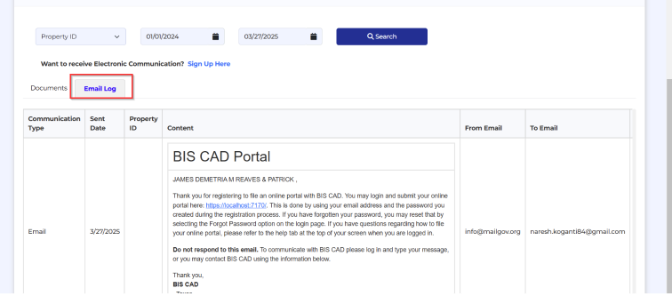
Taxpayer Portal: Successful user registration email now displays in the email communication log
- Taxpayers receive a successful registration confirmation email when registering for the Taxpayer Portal. This email is now displayed in the users communication email log within the Taxpayer Portal.
Agent Appeals: Agent signature and date now requires on Settlement offer and Withdraw pop-up
- The Agent’s name and date are now required when accepting and online settlement offer or when withdrawing and an online appeal.

Taxpayer Portal: Separate email templates triggered for CAD Evidence published and ARB letters published.
- For Harris clients, there are two separate email templates triggered when appeals documents are published. CAD or District evidence published in PACS will trigger the “CAD Evidence” email template and ARB letters/Hearing Notices published in PACS will trigger the “Document Available” email template. These email templates can be found in BIS Admin> Online Appeals> Email Templates.
Taxpayer Appeals: User Signature is now generated on Rejected Settlement Offer PDF for Online appeals.
- Rejected online settlement offers now display the owner signature on the PDF. For Harris clients, the PDF is pushed into PACS in the taxpayer evidence field. For Standalone clients, the system generated PDF can be viewed in the BIS Admin Dashboard for Online Appeals.
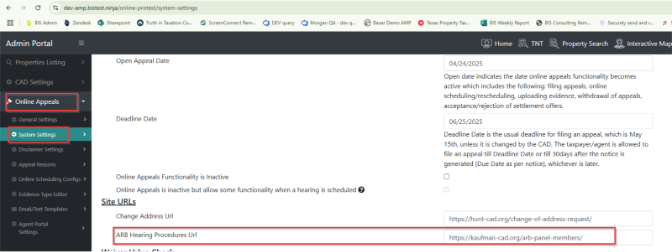
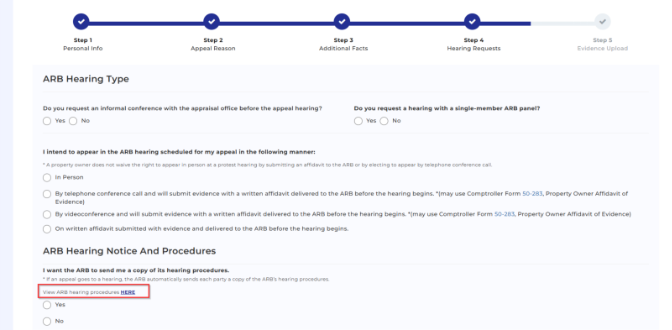
Taxpayer Appeals: New setting to link CAD Hearing Procedures to step 4 of Taxpayer Appeals.
- If CAD has their ARB hearing procedures on their CAD website, there is a new setting that allows clients to link the URL to step for of the Taxpayer Appeals process for users to be able to access the ARB Hearing Procedures. Enter the CAD URL in BIS Admin> Online Appeals> System Settings> ARB Hearing Procedures URL.